
The GTA V AuraV mod adds path-traced lighting, ray-traced reflections, volumetric clouds and reworked weather to GTA V Enhanced on PC. To install it, download the free AuraV Lite zip from the creator’s site, unzip everything next to GTA5_Enhanced.exe, start Story Mode and press F10. However, it needs an NVIDIA RTX graphics card, it does not work in GTA Online, and the developer has not published official benchmarks. The Full version sits behind Patreon and adds water and vehicle effects.
Summary: GTA V AuraV Mod
- Launched: October 5, 2026, by the modder Kypos, for GTA V Enhanced on PC.
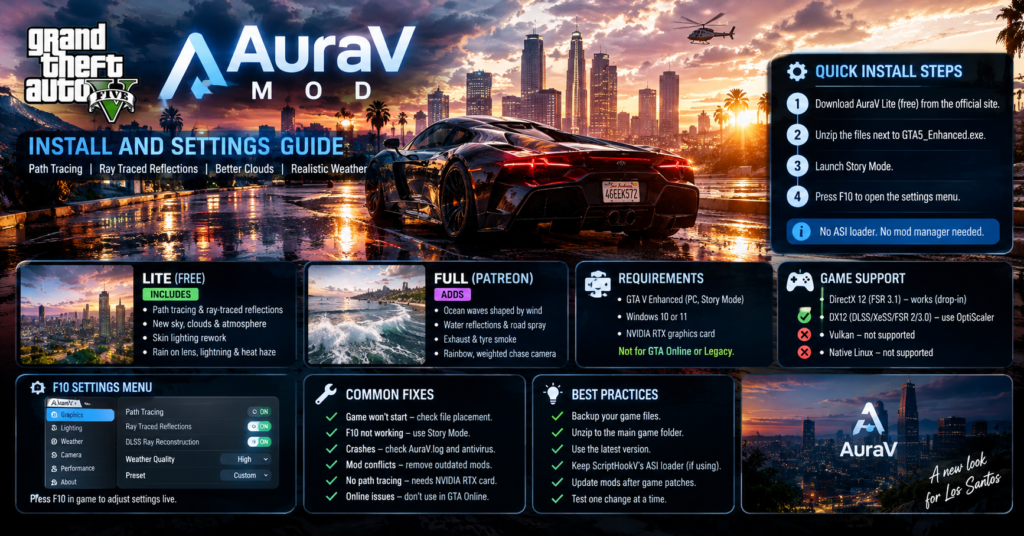
- Lite: free with no account, and it includes path tracing, ray-traced reflections, the new sky, skin lighting, rain on the lens, lightning and heat haze.
- Full (Early Access): Patreon only, and it adds ocean waves shaped by wind, water reflections, road spray, smoke, rainbows and a weighted chase camera.
- Needs: GTA V Enhanced in Story Mode, Windows 10 or 11, and an NVIDIA RTX card.
- Install: unzip next to GTA5_Enhanced.exe, then press F10 in Story Mode. No ASI loader or mod manager is needed.
- Not for: GTA Online or GTA V Legacy (the studio lists a separate AuraV Legacy).
- Not confirmed: official performance numbers, a minimum RTX model and VRAM needs.
What AuraV changes in GTA V Enhanced
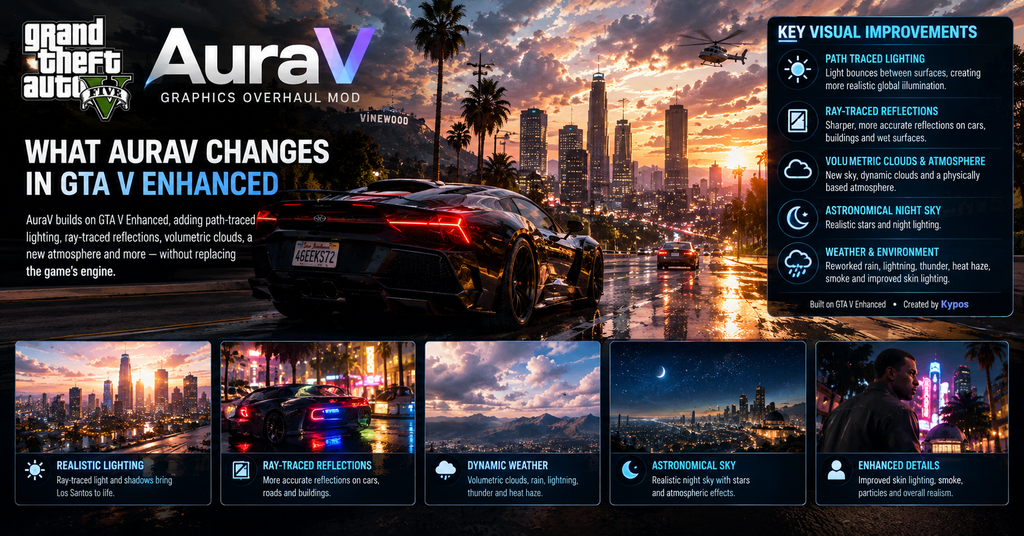
AuraV is a graphics overhaul for GTA V Enhanced, the PC version with built-in ray tracing. Instead of replacing the engine, it builds on what Enhanced already offers. Light now bounces between surfaces, streetlights and glowing signs cast ray-traced shadows, and reflections are ray traced too. NVIDIA DLSS Ray Reconstruction then cleans up the noisy result.
The sky changes as well. AuraV swaps the stock sky for volumetric clouds and a physically based atmosphere, and it adds an astronomical night sky. Weather gets attention too, with reworked rain, lightning and thunder, heat haze, smoke and skin lighting.
Some outlets credit the mod to KBase. The creator’s own site names Kypos, so this guide uses that name.
Lite vs Full: what you get
The developer splits the mod into two editions, and the free one is generous:
| Feature | Lite (free) | Full (Patreon, Early Access) |
|---|---|---|
| Path-traced light and shadows | Yes | Yes |
| Ray-traced reflections | Yes | Yes |
| New sky, clouds and atmosphere | Yes | Yes |
| Skin lighting rework | Yes | Yes |
| Rain on the lens | Yes | Yes |
| Lightning, thunder and heat haze | Yes | Yes |
| Live settings in game (F10) | Yes | Yes |
| Rainbows | No | Yes |
| Ocean waves shaped by wind | No | Yes |
| Water reflections and road spray | No | Yes |
| Exhaust and tyre smoke | No | Yes |
| Weighted chase camera | No | Yes |
Lite needs no account. Full needs a Patreon sign-in, and its download unlocks after you subscribe. In other words, start with Lite, because it already includes the headline path tracing.
What you need before you install
The creator lists four requirements:
- GTA V Enhanced on PC, played in Story Mode
- Windows 10 or 11
- An NVIDIA RTX graphics card for path tracing
- No ASI loader, because AuraV loads itself
The developer has not named a minimum RTX model or a VRAM figure. As a result, an older RTX card may run it poorly, and AMD or Intel cards will not get path tracing at all.
How to install AuraV Lite
The official install guide takes about a minute:
- Download Lite from the downloads section of the AuraV Enhanced page on kyposmods.com. It is free and needs no account.
- Open your game folder, the one that holds GTA5_Enhanced.exe. On Steam, right-click the game, choose Manage, then Browse local files. On the Rockstar launcher, open Settings, pick the game under My installed games and choose Open Folder. On Epic, click the three dots on the game, choose Manage, then click the folder icon.
- Unzip everything into that folder, straight next to GTA5_Enhanced.exe and not inside a new folder. You should end up with AuraV.asi, msdmo.dll, an AuraV folder and AuraV.bank in the right places.
- Start the game in Story Mode. AuraV does not run in GTA Online.
- Press F10 to open AuraV’s settings.
Updating works the same way. AuraV checks for a new version each time the game starts, so download the new zip and unzip it over the old files. Your settings stay. To remove it, delete AuraV.asi, msdmo.dll and the AuraV folder.
F10 settings, path tracing and DLSS Ray Reconstruction
Press F10 and a dock of tools appears along the bottom of the screen. Each tool opens a panel, and every change shows up right away, so you can tune the look while you drive. The game saves everything to AuraV\AuraV.ini in the game folder, and you can change the menu key there.
Here is the honest part. The developer has not published recommended presets or a list of slider ranges, and DLSS Ray Reconstruction comes built into the path tracing rather than as a separate toggle in the notes. So treat the steps below as practical suggestions, not official values:
- Start with the defaults. Play for a few minutes before you touch anything.
- Change one setting at a time. The live preview makes it easy to see which one costs frames.
- Lower your game’s resolution scaling or upscaling quality first. That is usually the cheapest way to win frames back.
- Measure with a frame counter such as MSI Afterburner, because nobody has published verified numbers yet.
Performance: what is and is not known
You may search for RTX 4080 and RTX 4090 benchmarks, but none exist from the developer or from independent testers that I could find. One outlet says the developer has not published comprehensive benchmarks, and another notes that frame rates may drop when several ray-tracing features run together. Therefore, any frame rate you see quoted for AuraV on a specific card needs a source.
What the sources do agree on is the hardware direction: path tracing is built for NVIDIA RTX cards. Beyond that, test it on your own PC.
OpenIV, ScriptHookV and ReShade
Compatibility is simpler than it looks:
| Tool | Works with AuraV? | What to know |
|---|---|---|
| OpenIV | Not needed | OpenIV has no official native support for GTA V Enhanced, and a community patch only lets it see the install |
| ScriptHookV | Yes | If you use it, AuraV leaves loading to its ASI loader, so keep that file in the game folder |
| ReShade and RenoDX | Yes, unsupported | They run alongside AuraV, but the developer does not support them |
| Legacy mods and OIV packages | No | Installing Legacy files into Enhanced can break the game |
In short, you do not need OpenIV or a mod manager for AuraV. If you also run other mods, check that each one explicitly lists GTA V Enhanced support.
AuraV not working or crashing: fixes
Start with the AuraV.log file in the AuraV folder, because it records what went wrong at startup. Then match your symptom:
| Symptom | Likely cause | Fix |
|---|---|---|
| Nothing happens on F10 | Files in the wrong place, or you are not in Story Mode | Put AuraV.asi and msdmo.dll next to GTA5_Enhanced.exe and AuraV.bank in the AuraV folder |
| The log says AuraV.asi failed to load or is missing | Antivirus blocked or removed the file | Restore it from quarantine, allow it, and restart the game |
| It will not load with ScriptHookV | The ASI loader is missing | Add ScriptHookV’s ASI loader to the game folder |
| Crash after adding other mods | Legacy files in an Enhanced install | Remove those mods and use only Enhanced-compatible versions |
| Broke after a game update | Old mod or ScriptHookV files | Update AuraV and match ScriptHookV to your game build |
| No path-tracing look | Non-NVIDIA graphics card | AuraV path tracing needs an NVIDIA RTX card |
Still stuck? The developer lists a Discord support channel and an email address, and the log file helps them diagnose the problem.
Safety, GTA Online and BattlEye
Use AuraV in Story Mode only. The creator states it does not work in GTA Online, and modded files in online sessions can cost you your account, so keep the two separate. Some guides also report that you may need to launch without BattlEye for single-player mods. That is a third-party claim, so check the current instructions for your launcher before you change anything.
In addition, download only from the creator’s official page. Several mirror sites repost the mod without the same update checks, and antivirus tools may flag new mods either way.
Tips and common mistakes
Do not unzip into a subfolder. The files must sit next to GTA5_Enhanced.exe.
Do not buy Full before you try Lite. Lite already has the path tracing.
Do not assume AMD or Intel will work. Path tracing needs an NVIDIA RTX card.
Do not install Legacy mods alongside it. They can break an Enhanced install.
Do not quote benchmarks without a source. None are published yet.
If you want to compare your PC against another path-traced game, our 007 First Light system requirements guide lists every tier, including the path tracing specs.
What could change
AuraV is new, so the Lite feature set, the Full edition’s contents and the install steps can change with updates. Everything here is accurate as of October 14, 2026, based on the creator’s site and the outlets cited. Check the official AuraV page and its patch notes before you install.
Conclusion
AuraV gives GTA V Enhanced path tracing, a new sky and reworked weather for free through the Lite edition. Unzip it next to GTA5_Enhanced.exe, play in Story Mode and press F10 to tune it. Because no official benchmarks exist, test your own frame rate, and fix most problems by checking file placement, antivirus quarantine and ScriptHookV’s loader.
FAQs
Is the GTA V AuraV mod free?
The Lite version is free with no account, and the Full version costs a Patreon subscription.
Does AuraV work in GTA Online?
No. It is for Story Mode only.
Do I need an NVIDIA card?
Yes. Path tracing needs an NVIDIA RTX graphics card.
Do I need OpenIV or ScriptHookV?
No. AuraV loads itself, but if you already use ScriptHookV, keep its ASI loader in the game folder.
Does it work on GTA V Legacy?
This guide covers GTA V Enhanced. The creator lists a separate AuraV Legacy edition.
What is the F10 key for?
It opens AuraV’s in-game settings dock, and the changes apply live.
For more updates visit: GAME SPEC