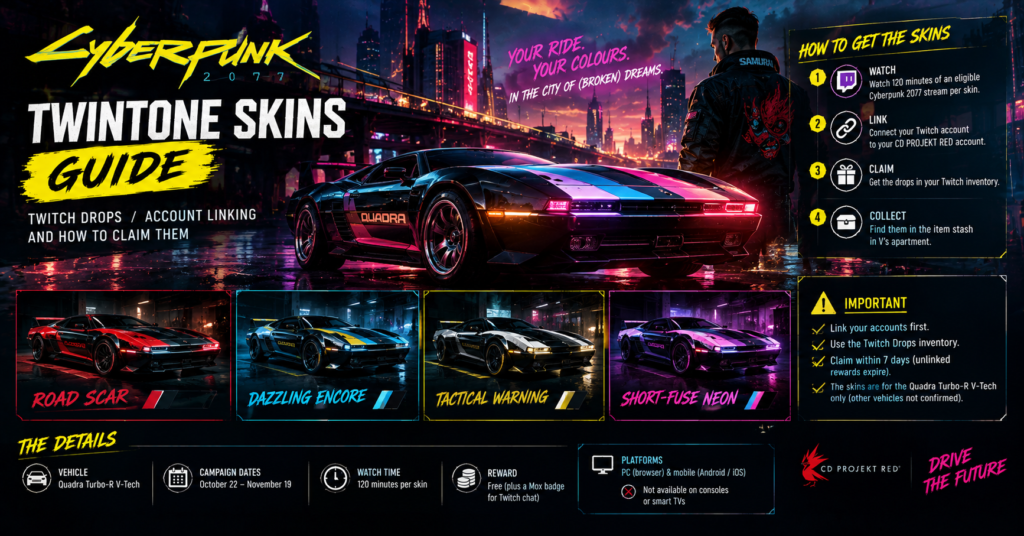

The four Cyberpunk 2077 TWINTONE skins for the Quadra Turbo-R V-Tech come from Twitch Drops, and you earn each one by watching 120 minutes of an eligible Cyberpunk 2077 stream. The campaign runs from October 22 to November 19, so you need to finish before it ends. Link your Twitch account to a CD PROJEKT RED account first, because linking is what delivers the skins in game. Afterward, collect them from the item stash in V’s apartment. As of October 25, 2026, I found no source that explains how to apply them to other vehicles.
Summary: Cyberpunk 2077 TWINTONE Skins
- Skins: Road Scar, Dazzling Encore, Tactical Warning and Short-Fuse Neon.
- Vehicle: Quadra Turbo-R V-Tech.
- Requirement: 120 minutes of watch time per skin.
- Dates: October 22 to November 19.
- Linking: CD PROJEKT RED account plus Twitch account.
- Claim: Twitch Drops inventory, then the stash in V’s apartment.
- Not confirmed: GOG linking steps, using the skins on other cars and paint scanner details.
What the TWINTONE Skins Are
TWINTONE skins are two-color paint jobs. CD PROJEKT RED released four of them for one vehicle, the Quadra Turbo-R V-Tech, through a Twitch Drops campaign. The studio’s tagline reads, “Your ride. Your colours. In the City of (Broken) Dreams.”
| Item | Detail |
|---|---|
| Skins | Road Scar, Dazzling Encore, Tactical Warning, Short-Fuse Neon |
| Vehicle | Quadra Turbo-R V-Tech |
| Campaign dates | October 22 to November 19 |
| Watch time | 120 minutes per skin |
| Cost | Free |
| Bonus | Mox badge for Twitch chat |
| In-game delivery | Item stash in V’s apartment |
The official Twitch Drops page labels the campaign “Update 2.4,” but the skins launched on October 22, 2026, alongside Update 2.5, according to a news report. Therefore, I treat the dates on the official page as correct and the label as a leftover. The page also does not state a year, so the October 22, 2026 launch comes from the news report.
How to Link Your Accounts
You can claim drops on Twitch without linking anything. However, you cannot get them in game unless you link your accounts. Also, unlinked rewards expire seven days after you claim them.
Here is the process the official page describes:
- Open the linking page on the Cyberpunk drops site.
- Sign in to your CD PROJEKT RED account. If you do not have one, you can create a free account during this step.
- Connect your Twitch account. Then confirm the link.
- Check the link before you watch. This way, you avoid losing a claim to the seven-day expiry.
The page only describes linking a Twitch account to a CD PROJEKT RED account. It does not mention GOG, Steam, Epic, PSN or Xbox accounts. As a result, I cannot confirm any GOG-specific step, even though GOG players often use a CD PROJEKT RED account. Instead of guessing, check the linking page for your platform.
How to Earn the Four Skins
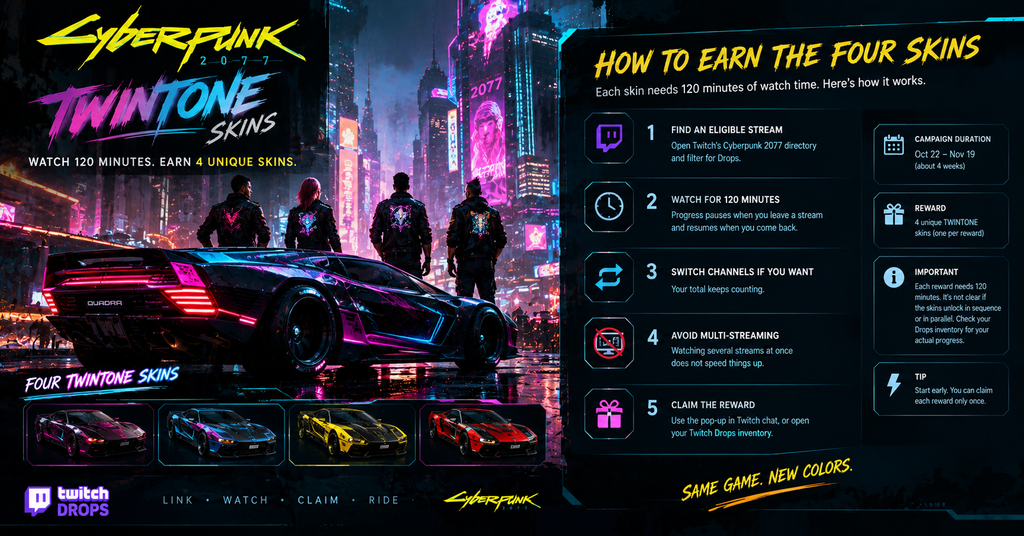
Each skin needs 120 minutes of watch time. Here is how the process works.
- Find an eligible stream. Open Twitch’s Cyberpunk 2077 directory and filter for Drops.
- Watch for 120 minutes. Progress pauses when you leave a stream and resumes when you come back.
- Switch channels if you want. Your total keeps counting.
- Avoid multi-streaming. Watching several streams at once does not speed things up.
- Claim the reward. Use the pop-up in Twitch chat, or open your Twitch Drops inventory.
The page says each reward needs the 120-minute requirement, and it does not say whether the skins unlock in sequence or in parallel. So plan for a long watch total, but check your Drops inventory to see your actual progress.
Because the campaign runs about four weeks, you have time. Even so, start early, since you can claim each reward only once.
Where to Watch and Which Devices Work
| Item | Detail |
|---|---|
| Works | PC or Mac browsers |
| Works | Twitch app on Android or iOS |
| Does not work | Consoles |
| Does not work | Smart TVs and other TV apps |
If you play on console, you can still earn drops on a phone or computer, then play on your console. That depends on the linked account, so confirm it before you buy anything.
The campaign also gives a Mox badge for Twitch chat. To get it, subscribe to a participating streamer with a paid subscription. According to one report, Prime subscriptions do not count.
How to Get the Skins in Game
Once you link your accounts and claim the drops, the skins appear in the item stash in V’s apartment. Here is the sequence:
- Claim all four drops on Twitch.
- Launch Cyberpunk 2077 on your linked account.
- Go to V’s apartment.
- Open the item stash and collect the skins.
- Visit your Quadra Turbo-R V-Tech to apply them.
I found no source that describes the exact apply screen. Because of that, I cannot tell you whether you apply the skins at a garage, in the vehicle menu or through the CrystalCoat paint system. Check your vehicle options after you collect them.
If you also plan to customize your cyberware in Update 2.5, our Cyberpunk 2077 Glamdoc locations guide covers the new hand skins.
CrystalCoat, Paint Scanner and Other Vehicles
Your keywords mention CrystalCoat, a paint scanner and applying TWINTONE skins to owned vehicles. Unfortunately, I could not verify any of that. The official page says the skins are for the Quadra Turbo-R V-Tech, and it does not mention other cars. The one community guide I found on CrystalCoat schemes no longer exists on Steam, and Steam flags it as incompatible with the game, so I did not use it.
Here is what I can say:
- Confirmed: the four skins target the Quadra Turbo-R V-Tech.
- Not confirmed: whether any skin works on other vehicles.
- Not confirmed: how the paint scanner saves skins.
- Not confirmed: where CrystalCoat database locations sit.
Until CD PROJEKT RED or a reliable guide documents it, treat claims about other cars as unverified.
Common Mistakes to Avoid
- Skipping the account link. Without it, you cannot get the skins in game.
- Waiting past seven days. Unlinked rewards expire after seven days.
- Watching on console. Consoles and TV apps do not support Drops.
- Multi-streaming. It does not earn faster.
- Missing the deadline. The campaign ends November 19.
- Expecting other cars. The skins target one vehicle.
Conclusion
The Cyberpunk 2077 TWINTONE skins are four free Quadra Turbo-R V-Tech paint jobs that you earn with 120 minutes of Twitch watch time each before November 19. Link your Twitch and CD PROJEKT RED accounts, claim the drops and collect the skins from your apartment stash. Everything here is accurate as of October 25, 2026, and the studio may change the campaign details.
FAQs
How do I get the TWINTONE skins in Cyberpunk 2077?
Watch 120 minutes of an eligible Cyberpunk 2077 Twitch stream per skin, then claim the drops.
What are the four skin names?
Road Scar, Dazzling Encore, Tactical Warning and Short-Fuse Neon.
Do I need to link my account?
Yes, if you want the skins in game. Link your Twitch account to a CD PROJEKT RED account.
Can I earn Twitch Drops on console?
No. Consoles and smart TV apps do not support them, but a phone or computer works.
When does the campaign end?
November 19.
Do the skins work on other cars?
Not confirmed. The skins target the Quadra Turbo-R V-Tech.
For more updates visit: GAME SPEC