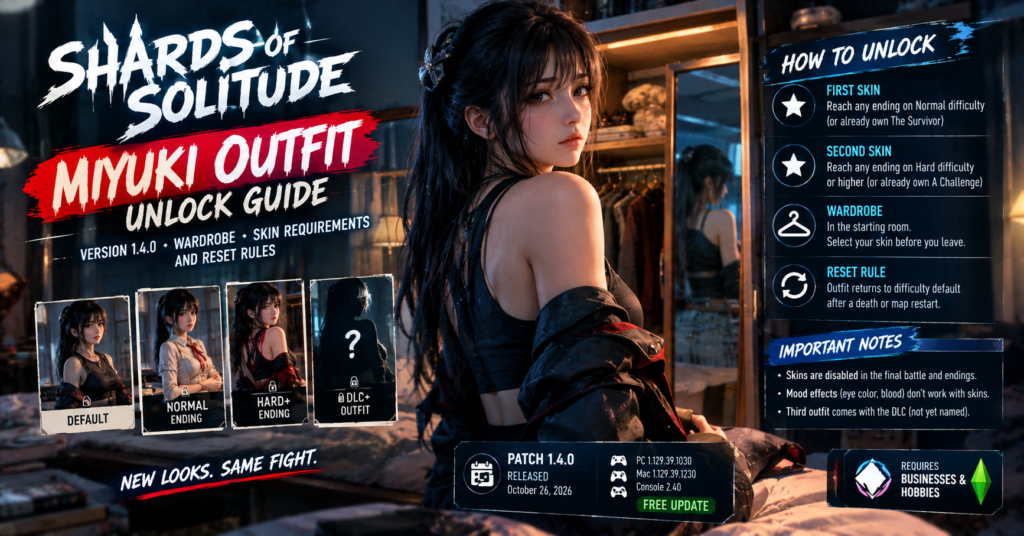

Shards of Solitude Version 1.4.0, released on October 26, 2026, adds a wardrobe in the starting room where you can pick a skin for Miyuki. You unlock the first skin by reaching any ending on Normal difficulty and the second by reaching any ending on Hard difficulty or higher. If you already own the The Survivor or A Challenge achievement, the matching skin unlocks automatically with no replay. However, Miyuki’s outfit resets to the default for your difficulty after every death or map restart, so you need to reselect it each run.
Summary: Shards of Solitude Miyuki Outfit Unlock
- Update: Version 1.4.0 on October 26, 2026, plus a same-day hotfix.
- Where: a wardrobe in the starting room.
- Skin one: reach any ending on Normal difficulty, or already own The Survivor.
- Skin two: reach any ending on Hard difficulty or higher, or already own A Challenge.
- Resets: the outfit goes back to the difficulty default after a death or map restart, which is intended.
- Limits: skins stay off in the final battle and the endings, and mood effects do not work while one is on.
- Third outfit: it arrives with the DLC, and the developer has not named any of the skins.
What Version 1.4.0 adds
TraNe, the solo developer at Chilling Designs, calls Version 1.4.0 the final patch before the DLC. The headline feature is something players have asked about for months: new outfits for Miyuki.
The update brings these skin features:
| Feature | Detail |
|---|---|
| New outfits | Two, with a third added when the DLC releases |
| Wardrobe | In the starting room, where you choose Miyuki’s skin |
| Cloth and hair | New simulation for Miyuki’s clothing and hair |
| Mad-state lines | New voice lines for her Mad state |
The developer has not published the outfits’ names. The next update will focus on a new story chapter, The Roots of Evil, a prequel that the studio teased on October 6.
How to unlock each Miyuki skin
The requirements tie to difficulty, and both use endings you may already have:
| Skin | Requirement | Matching achievement |
|---|---|---|
| First skin | Reach any ending on Normal difficulty | The Survivor |
| Second skin | Reach any ending on Hard difficulty or higher | A Challenge |
The notes say existing owners get a free pass. If you already unlocked The Survivor, the first skin unlocks automatically. If you already own A Challenge, the second one does too. You do not need to replay either difficulty.
That covers a long list of searches for how to unlock a skin on Normal or Hard. Hard or higher also covers the harder modes, so an ending there counts for the second skin. Any ending counts according to the notes, though they do not say whether Resignation to Fate, the ending where you die without resisting, qualifies. Use a proper ending to be safe.
The quickest endings for each skin
You can finish a run quickly if you only want the skin. The two fastest choices are short branches near the end. These steps come from a community walkthrough written before Version 1.4.0, so the choices may differ slightly in the current build:
| Ending | How to reach it |
|---|---|
| Despair | After you get the key and Miyuki confronts you, pick Give Up at the choice |
| Together. Forever. | At the same choice, pick Escape, then use the key on the exit door |
Both appear in the achievement list as Surrender and I will follow you until the end. Pick the difficulty that matches the skin you want before you start, because the ending only counts for the difficulty you played.
Other endings exist, including Reconciliation, Liberation and You Belong To Me, but they need the ritual route and take longer. Treat the two choice endings as the shortcut.
Where the wardrobe is and how to use it
The wardrobe sits in the starting room, the room you begin each run in. Interact with it, pick an unlocked skin, then start playing. A locked skin stays unavailable until you meet its requirement.
The hotfix released the same day fixed one wardrobe problem. Before it, pausing while you selected a skin could break the interface. Now you cannot pause during skin selection, so finish your choice first.
Why Miyuki’s outfit resets
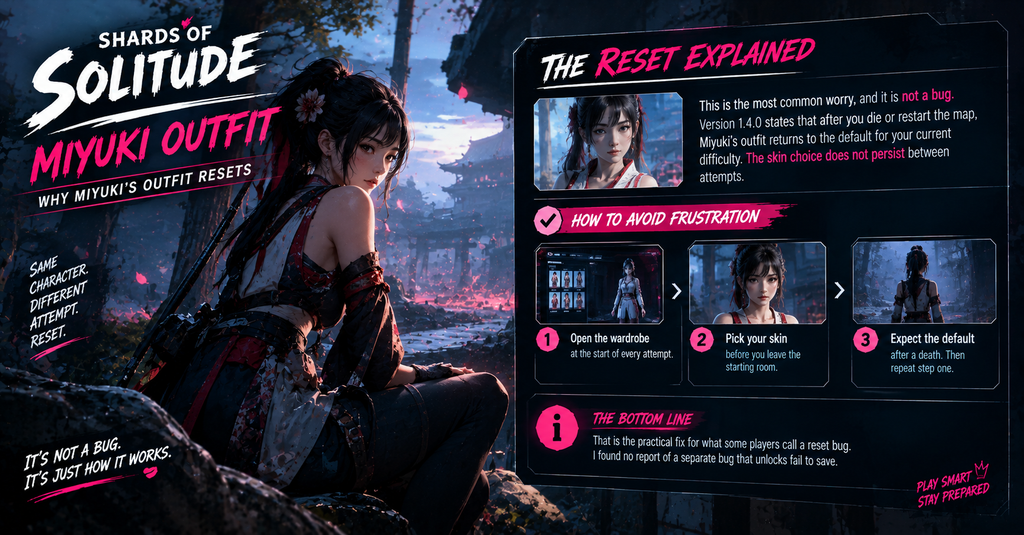
This is the most common worry, and it is not a bug. Version 1.4.0 states that after you die or restart the map, Miyuki’s outfit returns to the default for your current difficulty. The skin choice does not persist between attempts.
To avoid frustration:
- Open the wardrobe at the start of every attempt.
- Pick your skin before you leave the starting room.
- Expect the default after a death. Then repeat step one.
That is the practical fix for what some players call a reset bug. I found no report of a separate bug that unlocks fail to save.
What skins change and what they do not
Skins come with limits you should know before you pick one:
- No skins in the final battle or the endings. Miyuki wears her normal look there.
- Mood effects are off. Eye color changes based on mood and blood on her face after a kill do not work while a skin is active.
- Cloth and hair move. The new simulation applies to her clothing and hair.
Because eye color tells you her mood, a skin makes her harder to read. That matters on harder difficulties, so consider wearing the default when you want every warning sign.
Other changes in 1.4.0 that affect runs
The patch also changes play beyond skins:
| Change | Detail |
|---|---|
| New traps | From Hard, Miyuki sets traps when she is not chasing you, and they deal 20 damage |
| Disarming | You can disarm a trap by crouching, but you cannot walk through it crouched |
| Madness | You now start with one bullet along with the pistol |
| Performance | MegaLights is off, which lowers shadow quality and raises FPS |
| Subtitles | A new subtitle setting sits under Gameplay |
| Escape key | You can press it to leave the pause menu |
The traps matter most if you are chasing the Hard skin, because they punish careless routes.
Tips and common mistakes
Check your achievements first. You may already own a skin.
Do not replay a difficulty you have finished. The notes say the unlock is automatic.
Do not expect your pick to stick. Select it again after every death.
Do not use a skin on Hard if you rely on mood cues. The eye color effect turns off.
Do not trust a skin list. The developer has named none.
If you like horror games with several endings, our Tenebris Somnia guide covers another recent horror release, including its puzzles.
What could change
The developer can adjust skin requirements, add outfits or change the reset rule in later patches, and a third skin comes with the DLC. Everything here is accurate as of October 26, 2026, based on the official Version 1.4.0 notes and the hotfix. Check the Steam news page for updates.
Conclusion
Version 1.4.0 gives Miyuki a wardrobe, and you earn the skins through endings on Normal and Hard. Check your achievements first, because The Survivor and A Challenge unlock them for free. Reselect your outfit every run, since a death or map restart returns Miyuki to her default look.
FAQs
How do I unlock Miyuki’s first skin?
Reach any ending on Normal difficulty, or already own The Survivor achievement.
How do I unlock the second skin?
Reach any ending on Hard difficulty or higher, or already own A Challenge.
Where is the wardrobe?
It is in the starting room.
Why did Miyuki’s outfit reset?
The outfit returns to the difficulty default after a death or a map restart, and that is intended.
Can I wear a skin in the final battle?
No. Skins stay off in the final battle and the endings.
How many outfits are there?
Two now, and a third arrives with the DLC.
For more updates visit: GAME SPEC