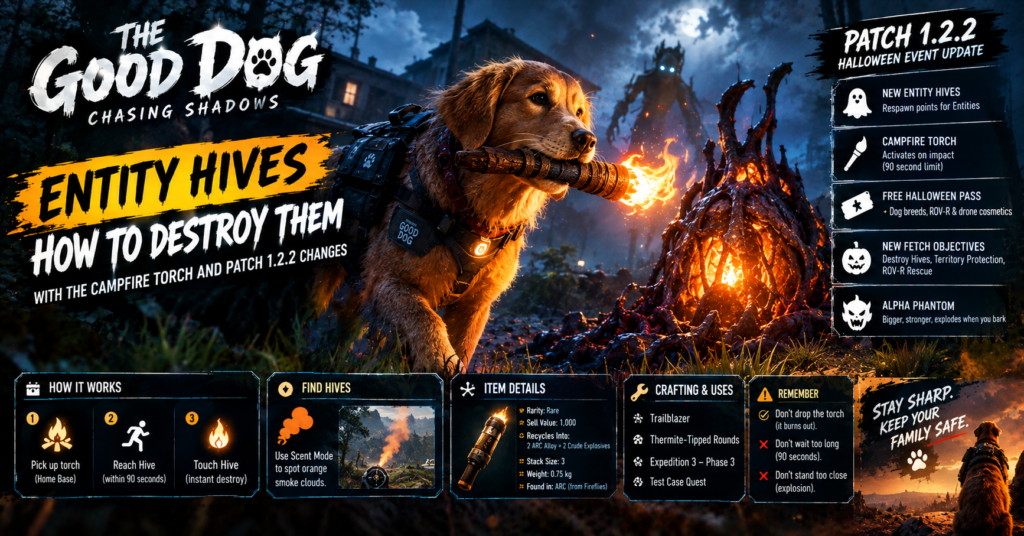

In The Good Dog: Chasing Shadows, Entity Hives are respawn points that bring defeated Entities back, and you destroy them with a lit Campfire Torch. Pick a torch up from the Home Base campfire, carry it to an active Hive within 90 seconds and touch the Hive to destroy it instantly. If you drop the torch or run out of time, it burns out, and a replacement respawns at the campfire. Patch 1.2.2, the Halloween Event Update, added the Hives, the torch, a free Halloween pass and new Fetch objectives.
Summary: The Good Dog Entity Hives
- What Hives do: act as respawn locations for defeated Entities.
- Respawn time: about 60 seconds, at a randomly chosen active Hive.
- How to destroy one: touch it with a lit Campfire Torch.
- Torch limit: 90 seconds, and dropping it ends the fire.
- Find Hives: Scent Mode shows small orange smoke clouds.
- New pass: A Good Dog Halloween, which is free.
- New foe: the Alpha Phantom, a larger Phantom that explodes when you bark at it.
What The Good Dog: Chasing Shadows Is
Poultry Party Games, a solo developer, made The Good Dog: Chasing Shadows. You play the family dog and defend your owners from paranormal Entities. It entered Steam Early Access on May 5, 2026, and it supports online co-op.
The game offers several modes, according to the store description:
| Mode | What you do |
|---|---|
| Protect | Survive the night while Entities enter your home and try to harm your sleeping family |
| Fetch | Explore run-down locations to retrieve something for your owner while Entities roam |
| Story | Explore the environment to find out why the Entities target you |
Your tools include flashlights, a portable speaker to distract enemies, a robot dog companion and your sense of smell. Earlier in October, patch 1.2.1 made Entities stronger and added the Phantom type, so 1.2.2 builds on a game that already fights back.
The developer’s goal is to release updates quickly, since the game stays in Early Access until Story Mode is complete.
Patch 1.2.2: The Halloween Event Update
The patch is listed for October 26 to 27, 2026. Here is what it adds, based on the patch information available when I wrote this:
| Feature | Detail |
|---|---|
| Entity Hives | New respawn points that appear near Points of Interest |
| Campfire Torch | The tool that destroys Hives |
| Progression pass | A Good Dog Halloween, a free pass with Halloween cosmetics |
| Cosmetic targets | Dog breeds, the ROV-R robot dog and the drone |
| New Fetch objectives | Destroy Hives, Territory Protection and ROV-R Rescue |
| Community event | Pumpkins count toward a Halloween Community Quota |
Because the game is in Early Access, values like timers can change in later patches, so check the in-game patch notes menu. Patch 1.2.1 already improved that menu to show all earlier patches.
How Entity Hives Work

Hives spawn near Points of Interest, which are the key locations in each map. They work as infinite respawn locations for defeated Entities.
Here is the loop:
- You kill an Entity.
- About 60 seconds later, it respawns at a randomly selected active Hive on the map.
- If more Hives exist, the respawn point can be farther from where you killed it.
- If no active Hives remain, there is nowhere for defeated Entities to come back.
The last point is an inference from the description, so test it in a session. The practical result is clear, though: you cannot clear an area for good until you remove the Hives that feed it.
For another co-op horror game that adds a new threat late in its life, see our Escape from Playtime monsters guide.
How to Destroy Entity Hives With the Campfire Torch
Only one method works: a lit Campfire Torch. Here are the rules:
- Go to the Home Base campfire. That is where you pick up the torch.
- Pick up the torch. It lights and stays lit for 90 seconds.
- Run to an active Hive. Travel the shortest route you know.
- Touch the Hive with the lit torch. It ignites and is destroyed instantly.
- Return for a new torch if needed. Replacements respawn quickly at the campfire.
Two failure points matter:
| Failure | Result |
|---|---|
| You drop the torch on the ground | It burns out instantly |
| The 90 seconds run out | The torch burns out |
Because you carry the torch in your mouth, you cannot use other tools while you carry it. That is my reading of how a held item works, and the patch information does not confirm it, so watch your inventory.
Tips for torch runs
These tips are my suggestions, based on the confirmed rules:
- Find the Hive before you light the torch. Ninety seconds is not long.
- Clear the path first. Entities near the route can make you drop the torch.
- Take the shortest path. Every second counts.
- Do not stop to fight. A fight costs time and may cause a drop.
- Use a partner in co-op. One player scouts and clears, and the other carries the torch.
Scent Mode and the Orange Smoke
Scent Mode highlights nearby objectives with color-coded smoke trails. Entity Hives release small orange smoke clouds when you are within range, so you can use the smoke to find hidden Hives near Points of Interest.
Here is the efficient order:
- Use Scent Mode before you light the torch. Locate the Hive first.
- Note the direction of the orange smoke. It guides you to the Hive.
- Go back to the campfire for the torch. Then run to the Hive.
- Follow your own path. You already know where it is.
This order avoids the main trap, which is carrying a burning torch around while you search blind. The patch information says the smoke appears in range, so you must get close enough first.
New Fetch Objectives
Patch 1.2.2 adds three Fetch objectives:
| Objective | What it asks |
|---|---|
| Destroy Hives | Burn the Hives with the torch |
| Territory Protection | Eliminate a specific number of Entities |
| ROV-R Rescue | Retrieve a drone that someone left behind |
The Destroy Hives objective uses the torch mechanic directly. Territory Protection is where the Hives make life harder, because defeated Entities respawn, so destroy Hives first if you can.
Phantoms and the Alpha Phantom
Phantoms are flying Entities. They hover out of normal bite reach and fire electric orbs. To kill one, bark at it repeatedly while it is in range, and it drops to the ground, where you can bite it.
The Alpha Phantom is the Halloween upgrade. It is visibly larger, has more health and hits harder than a normal Phantom.
The counter is different, because barking at an Alpha Phantom makes it release a large burst of electricity. Here is how to handle it:
- Stand at the edge of the trigger radius. Do not get closer than you need to.
- Bark once. That triggers the response.
- Retreat or dodge the explosion. Move out of the burst.
- Repeat. Keep barking and dodging until the Alpha drops to the ground.
- Bite it. That finishes the job once it lands.
The explosion is the hazard. A careless bark at close range will injure you, so respect the radius. Patch 1.2.1 already taught players that electricity hurts, since Banshees can electrocute dogs and being zapped while holding a fuse destroys the fuse.
The Halloween Pass and Community Quota
Patch 1.2.2 adds the A Good Dog Halloween progression pass, which is free and includes Halloween cosmetics for dog breeds, the ROV-R and the drone.
The community event works differently. Destroying pumpkins near Points of Interest, along with hidden Base pumpkins, adds to a shared Halloween Community Quota, and meeting it unlocks a permanent item. The patch information does not give the quota number or the item, so I will not guess either.
Common Mistakes
- Lighting the torch too early. The 90 seconds start counting at once.
- Dropping the torch. It burns out instantly.
- Ignoring Scent Mode. Orange smoke finds the Hive for you.
- Barking at an Alpha Phantom from close range. It explodes.
- Skipping the Hives in Territory Protection. Entities keep respawning.
Conclusion
Entity Hives make Entities respawn about 60 seconds after you kill them, and the Campfire Torch is the only way to stop it. Use Scent Mode to find the orange smoke, grab a torch and reach the Hive within 90 seconds. Everything here is accurate as of October 27, 2026, and the developer may adjust the numbers during Early Access.
FAQs
How do I destroy Entity Hives in The Good Dog?
Touch an active Hive with a lit Campfire Torch from the Home Base campfire.
How long does the torch stay lit?
It stays lit for 90 seconds, and dropping it ends it at once.
How fast do Entities respawn?
About 60 seconds after you kill them, at a randomly selected active Hive.
How do I find Entity Hives?
Use Scent Mode and look for small orange smoke clouds near Points of Interest.
How do I beat the Alpha Phantom?
Bark from the edge of its trigger radius, dodge the electric burst and repeat until it falls.
Is the Halloween pass free?
Yes. A Good Dog Halloween is a free progression pass.
For more updates visit: GAME SPEC