
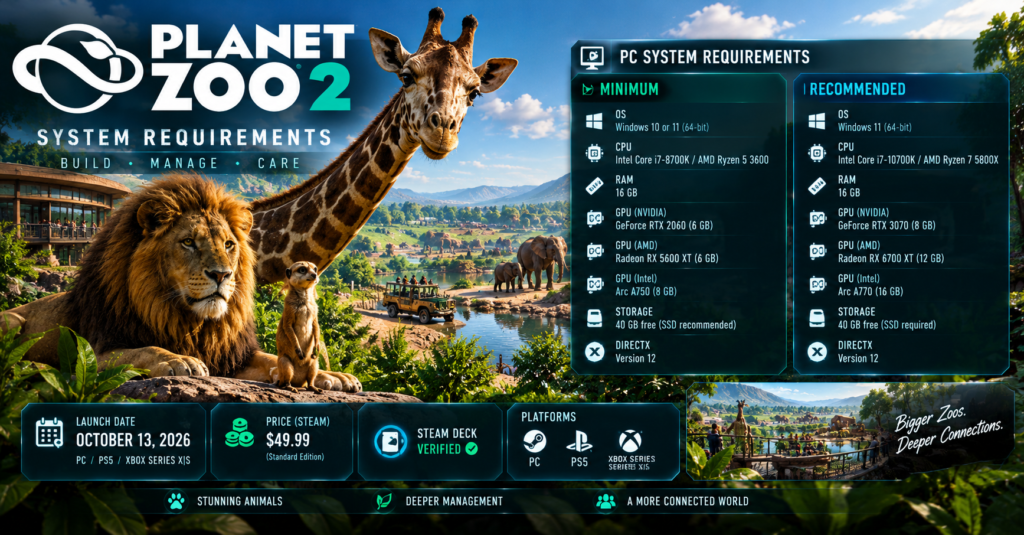

The Planet Zoo 2 system requirements start at 16 GB of RAM, a Core i7-8700K or Ryzen 5 3600, an RTX 2060 with 6 GB of VRAM and 40 GB of free storage. An SSD is recommended at the minimum tier, and the recommended tier requires one. Planet Zoo 2 is also Steam Deck Verified. However, the game has not launched yet, so these are Frontier’s published specs and not tested frame rates.
Summary: Planet Zoo 2 system requirements
- Launch: October 13, 2026 on PC, PS5 and Xbox Series X|S.
- RAM: 16 GB at both the minimum and recommended tiers.
- Minimum GPU: GeForce RTX 2060 (6 GB), Radeon RX 5600 XT (6 GB) or Arc A750.
- Storage: 40 GB free. SSD recommended at minimum and required for recommended.
- Operating system: Windows 10 or 11 at minimum, Windows 11 recommended.
- Steam Deck: Verified by Valve.
Planet Zoo 2 Minimum and Recommended PC Specs
Frontier lists these requirements on Steam. The Planet Zoo Wiki last checked them on September 26, 2026. Each CPU and GPU row gives you alternatives, so you only need one match per component.
| Component | Minimum | Recommended |
|---|---|---|
| Operating system | Windows 10 or 11, 64-bit | Windows 11, 64-bit |
| Intel CPU | Core i7-8700K | Core i7-10700K |
| AMD CPU | Ryzen 5 3600 | Ryzen 7 5800X |
| Memory | 16 GB RAM | 16 GB RAM |
| NVIDIA GPU | GeForce RTX 2060, 6 GB VRAM | GeForce RTX 3070, 8 GB VRAM |
| AMD GPU | Radeon RX 5600 XT, 6 GB VRAM | Radeon RX 6700 XT, 12 GB VRAM |
| Intel GPU | Arc A750, 8 GB VRAM | Arc A770, 16 GB VRAM |
| DirectX | Version 12 | Version 12 |
| Storage | 40 GB free, SSD recommended | 40 GB free, SSD required |
Two points deserve attention. First, Frontier warns that it cannot guarantee Windows 10 compatibility after Microsoft ends support, so Windows 11 is the safer choice. Second, the store page gives no target resolution, frame rate or zoo size for either tier. In other words, “minimum” means the game should start, not that it will run smoothly with a huge zoo.
Can I Run Planet Zoo 2 on an RTX 2060?
Yes, on paper. The desktop GeForce RTX 2060 with 6 GB of VRAM is the listed minimum NVIDIA card. However, a single matching part does not make your PC compatible. You also need 16 GB of system RAM, a CPU at least as fast as the Core i7-8700K or Ryzen 5 3600, DirectX 12 and 40 GB of free storage.
Here is how the common questions line up:
| Your setup | What the published specs say |
|---|---|
| Desktop RTX 2060 | Listed as the minimum NVIDIA GPU |
| Any other 6 GB card | Not automatic, because Frontier names specific models |
| RTX 3070 | Listed as a recommended GPU |
| 8 GB of RAM | Below the 16 GB minimum |
| Gaming laptop with an RTX 2060 | Not established, because laptop chips differ from desktop cards |
The laptop row matters more than most players expect. Laptop GPUs often share a name with desktop cards but perform differently. Therefore, wait for real benchmarks before you assume a laptop will keep up.
CPU performance also deserves a look. Simulation games like this one depend heavily on the processor as zoos grow, so a strong GPU cannot make up for a weak CPU. That is an inference from how management games generally work, not a tested Planet Zoo 2 result.
Planet Zoo 2 RAM Requirements: Is 16 GB Enough?

Sixteen GB of RAM is the listed requirement at both the minimum and recommended tiers. As a result, 16 GB meets the published spec. Meanwhile, nothing in Frontier’s listing says 32 GB improves performance, so I would not buy extra memory before launch benchmarks appear.
Do not confuse the three “GB” numbers on the page. System RAM is 16 GB, graphics card VRAM is 6 GB at minimum, and storage is 40 GB. They are separate requirements, and one cannot substitute for another.
Planet Zoo 2 Download Size and Storage
Planet Zoo 2 asks for 40 GB of free space on PC at both tiers. That figure is a free-space requirement, not a confirmed download size. Frontier has not published a separate compressed download size or a console install size, as of the latest update.
Still, the number gives you a useful planning target. Free up at least 40 GB before launch, and leave extra room for saves and downloaded Workshop content. That headroom is my suggestion, since Frontier does not state how large saves or Workshop files grow.
Does Planet Zoo 2 need an SSD?
It depends on the tier. An SSD is recommended for the minimum setup, and it is required for the recommended setup. Frontier does not promise the same loading times on a hard drive, so an SSD is the better choice either way.
Is Planet Zoo 2 Playable on Steam Deck?
Valve rated Planet Zoo 2 as Steam Deck Verified about a month before launch. According to Steam Deck HQ, the verification notes say the default controller layout works, the controller icons display correctly and the in-game text stays readable. In addition, the first-time setup needs an internet connection, but you can play offline afterward.
However, Verified does not mean a guaranteed frame rate. The Deck’s hardware sits well below the game’s listed minimum specs, and Steam Deck HQ itself voiced some worry about performance. Therefore, treat the badge as a good sign and wait for post-launch testing before you rely on it for large zoos.
Planet Zoo vs Planet Zoo 2: What Changed
Planet Zoo 2 asks for far more than the original. If your PC just met the first game’s minimums, it probably will not meet these.
| Component | Planet Zoo | Planet Zoo 2 |
|---|---|---|
| Intel CPU | Core i5-2500 | Core i7-8700K |
| AMD CPU | FX-6350 | Ryzen 5 3600 |
| RAM | 8 GB | 16 GB |
| NVIDIA GPU | GTX 770 (2 GB) | RTX 2060 (6 GB) |
| AMD GPU | Radeon R9 270X (2 GB) | Radeon RX 5600 XT (6 GB) |
| Storage | 16 GB | 40 GB, SSD recommended |
Platforms, Launch Time and Preloading
Planet Zoo 2 launches on PC, PlayStation 5 and Xbox Series X|S on October 13, 2026. Frontier also announced GeForce NOW support, which streams the game instead of running it on your own hardware. On the other hand, Frontier states no current plans for PS4, Nintendo Switch, Switch 2 or macOS.
TheClick lists the unlock as 3 PM BST on October 13. For US players, that works out as follows:
| Time zone | Unlock time |
|---|---|
| Eastern (EDT) | 10:00 AM |
| Central (CDT) | 9:00 AM |
| Mountain (MDT) | 8:00 AM |
| Pacific (PDT) | 7:00 AM |
Frontier says Steam players who pre-purchased can preload, and the target window starts on October 12. However, that date is a plan and could still move. Also, a preload does not let you play early, since the files unlock at launch.
Tips Before You Buy
- Check each part separately. Compare your CPU, GPU, RAM and storage one by one.
- Verify laptop GPUs. A laptop RTX 2060 is not the same as the desktop card in the listing.
- Plan for Windows 11. Frontier recommends it, and Windows 10 support is not guaranteed.
- Prefer an SSD. It is required at the recommended tier and advised at minimum.
- Wait for benchmarks if you are close to the minimum. Frontier has not published frame-rate targets.
- Pre-purchase carefully. Retailer listings show a $49.99 regular price for Standard and $64.99 for Deluxe on Epic, according to GG.deals, but check the official store for the final US price.
Common Mistakes
- Reading VRAM as RAM. The 6 GB figure is graphics memory, not the 16 GB of system memory.
- Assuming any 6 GB GPU qualifies. Frontier lists specific models.
- Treating 40 GB as the download size. It is the free-space requirement.
- Trusting “Verified” as a performance promise. It confirms controls and readability, not frame rates.
- Ignoring the CPU. A weak processor can limit a big zoo.
Conclusion
Planet Zoo 2 asks for a mid-range gaming PC. You need 16 GB of RAM, a Core i7-8700K or Ryzen 5 3600 class CPU, an RTX 2060 class GPU and 40 GB of free space, ideally on an SSD. Meanwhile, Steam Deck owners have a Verified badge to lean on, but real-world performance is still unknown. Everything here is accurate as of October 9, 2026, and Frontier may update the specs at or after launch.
FAQs
What are the minimum system requirements for Planet Zoo 2?
The minimum is a Core i7-8700K or Ryzen 5 3600, 16 GB of RAM, an RTX 2060 or RX 5600 XT with 6 GB of VRAM, DirectX 12 and 40 GB of storage.
Can I run Planet Zoo 2 with an RTX 2060?
The desktop RTX 2060 is the listed minimum NVIDIA card. However, Frontier has not published frame-rate targets, so performance is not guaranteed.
How much RAM does Planet Zoo 2 need?
It needs 16 GB at both the minimum and recommended tiers.
How big is Planet Zoo 2?
It needs 40 GB of free storage on PC. Frontier has not confirmed a separate download size.
Do I need an SSD for Planet Zoo 2?
An SSD is recommended at minimum and required for the recommended specs.
Is Planet Zoo 2 playable on Steam Deck?
Valve rated it Steam Deck Verified. However, real-world performance is still untested.
For more updates visit: GAME SPEC


